ComfyUI Qwen3 ASR
"A state-of-the-art "All-in-One" speech intelligence integration for ComfyUI, delivering SOTA accuracy across 52 languages and dialects."
Outperforms proprietary commercial APIs in multilingual accuracy and noise robustness, enabling professional-grade local transcription workflows.
Problem & Context
Existing ASR solutions often struggled with complex acoustic environments (noise, music, singing) and lacked the efficiency required for local high-concurrency workflows.
Engineering Constraints
- ▸Must maintain low latency (under 100ms for streaming)
- ▸Support for 52+ languages including regional dialects
- ▸Run on consumer-grade NVIDIA GPUs (CUDA)
Technical Architecture & Approach
Developed a high-performance ComfyUI wrapper for the Qwen3-ASR-1.7B and 0.6B models. Utilized the Whisper-style encoder and Qwen3-based decoder architecture to provide robust transcription with FlashAttention 2 optimization.
Key Decisions & Trade-offs
Unified LID and ASR
Integrating Language Identification and Transcription into a single pass significantly reduces overhead and simplifies multi-modal workflows.
Group Sequence Policy Optimization (GSPO)
Leveraging GSPO reinforcement learning enhances transcription stability and noise robustness, ensuring reliability in non-ideal recording environments.
NAR Forced Aligner Integration
Incorporating the non-autoregressive (NAR) Qwen3-ForcedAligner-0.6B enables precise word-level timestamps, critical for automated subtitling and animation sync.
Engineering Retrospective
- ✓Unified "All-in-One" models significantly outperform pipelined LID+ASR systems in both speed and accuracy.
- ✓Reinforcement learning (GSPO) is transformative for speech model stability.
Documentation & Guides
Detailed integration guides, node parameter breakdowns, and setup manuals for this project.
ComfyUI Qwen3 ASRA high-performance ComfyUI integration for the **Qwen3-ASR** model family. This extension provides state-of-the-art speech-to-text transcription, language identification, and precise word-level timestamps using the novel Qwen3 Forced Aligner.


Features
- High Accuracy: Supports Qwen3-ASR 0.6B and 1.7B models.
- Multilingual: Supports 52 languages and dialects with automatic language detection.
- Word-Level Timestamps: Optional integration with Qwen3-ForcedAligner-0.6B.
- Flexible Precision: Support for
bf16,fp16, andfp32to balance VRAM and speed. - Automatic Resampling: Internally handles audio resampling to 16kHz for optimal model performance.
- FlashAttention 2: Integrated support for FlashAttention 2 to significantly reduce VRAM usage and accelerate inference.
Preview
Installation
Manual Installation
- Navigate to your ComfyUI
custom_nodesdirectory:
`bash
cd ComfyUI/custom_nodes
`
- Clone this repository:
`bash
git clone https://github.com/kaushiknishchay/ComfyUI-Qwen3-ASR
`
- Install the dependencies using your ComfyUI Python executable:
`bash
# For portable versions, use the full path to your python.exe
python.exe -m pip install -r ComfyUI-Qwen3-ASR/requirements.txt
`
- (Recommended) Install FlashAttention 2 for maximum performance:
`bash
# For FlashAttention 2 (requires compatible NVIDIA GPU)
python.exe -m pip install -U flash-attn --no-build-isolation
`
OR
Install via ComfyUI Manager
- Search
ComfyUI-Qwen3-ASRbyKaushik
Model Setup
Models must be placed in the models/diffusion_models/Qwen3-ASR/ directory. Each model should be in its own subfolder containing the full weights and configuration.
Recommended Directory Structure:
ComfyUI/models/diffusion_models/Qwen3-ASR/
├── Qwen3-ASR-1.7B/
│   ├── config.json
│   ├── model.safetensors
│   └── ...
├── Qwen3-ASR-0.6B/
│   └── ...
└── Qwen3-ForcedAligner-0.6B/
    └── ...
Downloading Models
You can use the huggingface-cli to download the models directly into the correct folders:
huggingface-cli download Qwen/Qwen3-ASR-1.7B --local-dir models/diffusion_models/Qwen3-ASR/Qwen3-ASR-1.7B
huggingface-cli download Qwen/Qwen3-ForcedAligner-0.6B --local-dir models/diffusion_models/Qwen3-ASR/Qwen3-ForcedAligner-0.6B
Troubleshooting
- Python 3.13 Issues: If you encounter an
UnboundLocalErrorrelated tolazy_loader, ensure you have updated the package:
`bash
python.exe -m pip install -U lazy-loader
`
- VRAM Usage: The 1.7B model requires approximately 4-6GB of VRAM in
bf16mode. If you run out of memory, try the 0.6B model or usecpumode.
License
This project is licensed under the MIT License. The Qwen3 models are subject to the Qwen License Agreement.
Qwen3 ASR Transcriber
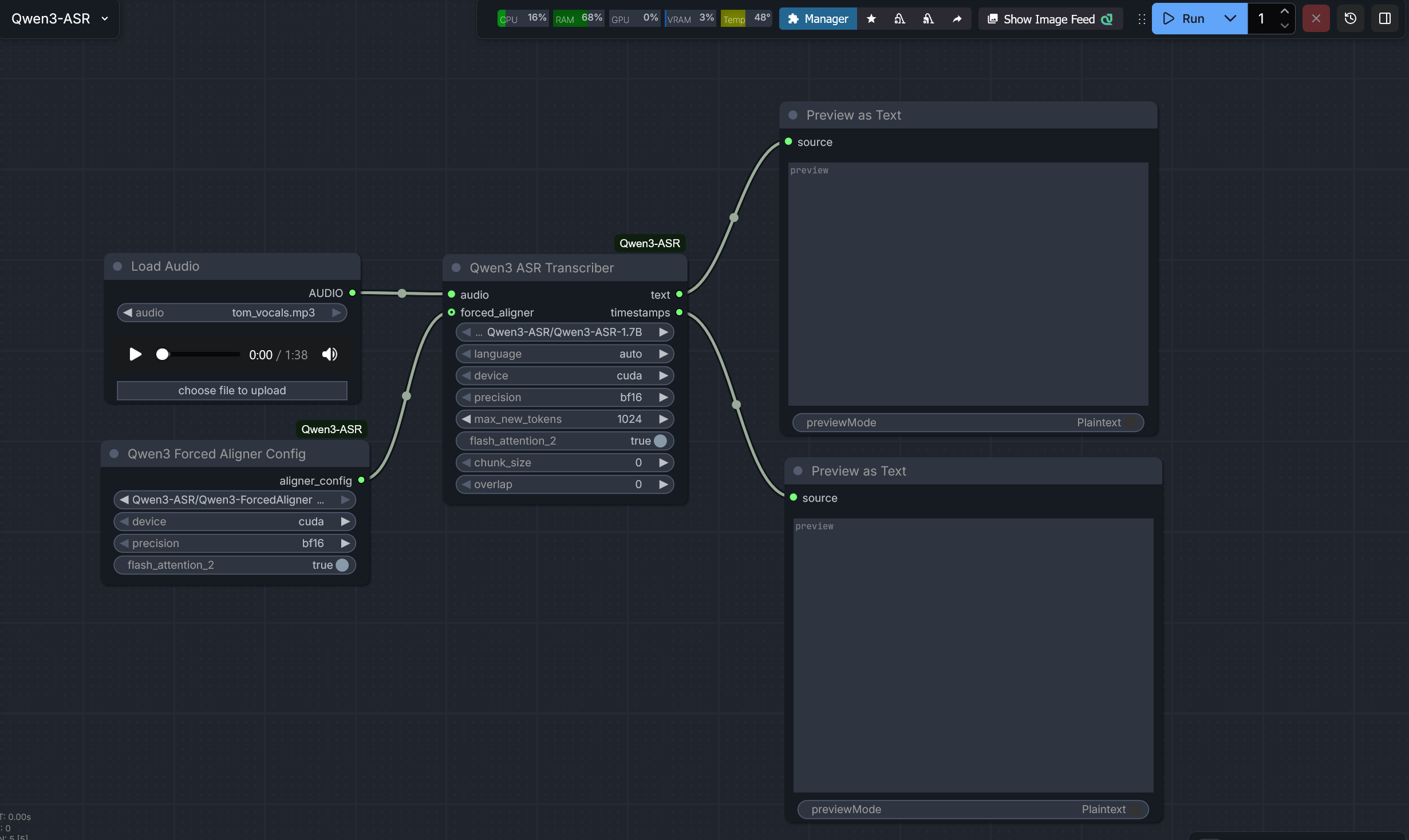
The Qwen3 ASR Transcriber is the primary inference node for the Qwen3-ASR model family. It converts speech from audio input into text and can optionally generate precise word-level timestamps when paired with a forced aligner.
Parameters
- audio: The input audio stream (usually from a *Load Audio* node).
- model_name: The directory name of the Qwen3-ASR model (0.6B or 1.7B) located in
models/diffusion_models/Qwen3-ASR/. - language: The target language for transcription. Use
autoto allow the model to automatically identify the spoken language. - device: The hardware device to run the model on (
cudaorcpu). - precision: The floating-point precision.
bf16is recommended for modern NVIDIA GPUs to save VRAM without losing accuracy. - max_new_tokens: The maximum number of tokens to generate in the output text. Increase this for longer audio files.
- flash_attention_2: Enable Flash Attention 2 for faster inference and lower VRAM usage. Requires a compatible NVIDIA GPU and the
flash-attnpackage installed. - chunk_size: Process audio in chunks of this many seconds (default: 30). Set to 0 to disable. This is critical for transcribing long audio files to prevent the model from exceeding its context window.
- overlap: The number of seconds of overlap between chunks (default: 2). This helps maintain context and prevents words from being cut off at chunk boundaries.
- forced_aligner (Optional): An optional input from the Qwen3 Forced Aligner Config node. If connected, the node will calculate and output word-level timestamps.
Outputs
- text: The raw transcription of the audio.
- timestamps: A formatted string containing word-level timestamps (e.g.,
[0.00 - 0.50] Hello). If no aligner is provided, this will return a status message.
Usage Tips
- Resampling: This node automatically resamples audio to 16kHz internally using Torch, ensuring compatibility with the model even if your input audio is 44.1kHz or 48kHz.
- Long Audio: For recordings longer than 30 seconds, ensure
chunk_sizeis enabled. If you notice repetition or hallucinations at the end of long files, try adjusting thechunk_sizeoroverlap. - Caching: The model is cached in memory after the first run. Changing the
model_name,device, orprecisionwill trigger a reload.
Example
- Connect a Load Audio node to the audio input.
- Select
Qwen3-ASR-1.7Bin model_name. - (Optional) Connect a Qwen3 Forced Aligner Config to the forced_aligner input to see timing data in the second output.
Qwen3 Forced Aligner Config
The Qwen3 Forced Aligner Config node is a helper node used to initialize the Qwen3-ForcedAligner-0.6B model. This configuration is required if you want the Qwen3 ASR Transcriber to output word-level timestamps.
Parameters
- model_name: The directory name of the Forced Aligner model located in
models/diffusion_models/Qwen3-ASR/. - device: The hardware device to run the aligner on. This should generally match the device used by the Transcriber node.
- precision: The floating-point precision for the aligner model.
- flash_attention_2: Enable Flash Attention 2 for the aligner model to improve performance and reduce memory footprint.
Outputs
- aligner_config: A configuration object that bundles the model path and loading arguments. Connect this to the
forced_alignerinput of the Qwen3 ASR Transcriber.
Why use this?
Standard ASR models generate text but often lack precise timing for when each word was spoken. The Forced Aligner is a specialized model that takes the generated text and the original audio to "align" them, providing highly accurate start and end times for every word.
Requirements
Ensure you have downloaded the Qwen3-ForcedAligner-0.6B model into your models/diffusion_models/Qwen3-ASR/ folder.